Kitchen appliance manuals your customers actually open
Air fryers, mixer grinders, kettles, coffee machines and cooktops all generate the same questions: how do I start, what does this light mean, how do I clean it, where do I get a new part. Put the answers one scan from the box.
- First look
- Front or top of the box; the first insert
- Long term
- A label near the rating plate, under the base or inside the lid
A kitchen appliance is used daily, cleaned weekly and repaired rarely, and its manual often leaves with the box. The questions customers ask are predictable: the first-use burn-off, what a flashing light or an error code means, how often to clean the filter, whether the basket can go in the dishwasher, and where to buy a replacement part.
Those questions are better answered with a ten-second video and three numbered steps than with page 34 of a booklet. An ItemDocs page puts them in the order a cook needs them, on the phone that is already on the counter.
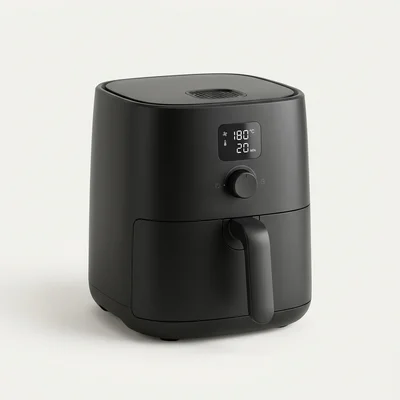
Our demo is a fictional air fryer, the Norra AF‑500, so you can see a complete kitchen-appliance page before building your own: open the demo.
What to put on a kitchen appliances page
- 01 · Start Here
The first use, step by step
Unpack, remove the display film, check the contents, place with 10 cm clearance, run empty for five minutes to burn off the coating, then try a preset. Link the setup video from the steps.
- 02 · Troubleshooting
Error codes and lights, by symptom
“Error light is flashing”: count the flashes, what each one means, what to try, and when to contact support. Add the codes customers search for as keywords so “E4” finds the right fix.
- 03 · Videos
Cleaning and care, shown
Short clips for the tasks that are hard to describe: pulling out the filter tray, descaling, fitting a new gasket. Upload them with captions or embed YouTube or Vimeo.
- 04 · FAQs
The questions support hears daily
Dishwasher-safe parts, foil and parchment, why food isn’t crisping, what the amber light means. FAQs are searchable and can link to the guide that explains more.
- 05 · Spare parts & accessories
Filters, plates and baskets
Part number, photo, compatibility note, price and a buy link. Customers who know the part exists buy it instead of replacing the appliance.
- 06 · Warranty & registration
Register from the kitchen
Duration, coverage and exclusions as text, the terms as a PDF, and a registration form that shows the warranty end date and sends a confirmation email.
An air fryer page, top to bottom
An illustration of how the modules come together for one product, in the order customers meet them. Every module is optional; publish what you have and add the rest as your search data shows what is missing.
- Notice banner: “Manual updated to v2.1” or a firmware update.
- Product, model and ID, with search: “filter”, “reset”, “warranty”.
- Start Here: six steps and a short setup video.
- Manual (PDF, searchable), quick-start guide and safety instructions.
- How-to guides: clean the filter, set temperature and timer, use the presets, replace the crisper plate, descale.
- Troubleshooting: won’t turn on, error light flashing (E4), unusual noise, food isn’t crisping.
- FAQs, warranty with registration, specifications.
- Spare parts and accessories with buy links; service and support details.
This is the structure of the Norra AF‑500 demo, which also has a Spanish translation. The brand is fictional; nothing you enter is stored.
Things to get right
- 01
Write troubleshooting from the symptom
Customers don’t know the fault; they see a light, a code or a smell. Title each issue with what they see, and put the safe checks first.
- 02
Keep safety on paper
Hot surfaces, steam, cord and child warnings belong on the printed safety sheet in the box, in the languages of each market. Repeat them online; don’t move them online.
- 03
One page per model, not per colour
Colour variants with identical documentation share one product and one code. Add the colours as variants so the page names the right SKU.
- 04
Put the code where it survives
The box catches the first use; a small label under the base or inside the lid is still there in two years. Print at least 20 mm with the ID underneath. See QR size and placement.
Related
- DemoNorra Air Fryer AF‑500A complete kitchen-appliance page (fictional brand).
- Use caseWarranty registrationReplace the paper card with a 30-second form.
- GuideQR codes for product manualsWhat to put behind the code and how to print it.
- IndustryHome appliancesACs, fans, washing machines, refrigerators, geysers and water purifiers.
Give your first product a page today.
One product is free forever, with every module. No card required.
See pricing →