Answer customers before they call
Many support calls about a new product are questions the manual already answers, somewhere. Put the answer one scan from the product, in the order customers ask, and use what they search for to close the rest.
- On the page
- Start Here, troubleshooting, FAQs, guides, warranty, spare parts and support.
- Content gaps
- Searches that found nothing, per product, with how often.
- Analytics
- Anonymous: no cookies, no accounts, no IP addresses stored.
- Start with
- The one product with the most tickets.
Why customers call
Look at a month of tickets for one product and the same reasons repeat:
- “How do I set it up?” in the first week after purchase;
- “What does this light, sound or code mean?”;
- “How do I clean, descale, reset or pair it?”;
- “Is this covered by the warranty, and how do I claim?”;
- “Where can I buy a new filter, blade or cable?”
Many of these don’t need a person. They need the right page of the manual at the right moment, and the manual is in a drawer, or in the bin with the box. The fix is not a better PDF on your website; it is getting the answer onto the customer’s phone from the product itself.
Answer on the page, in the order they ask
An ItemDocs page is organised by what the customer is trying to do, not by chapter. Each common call reason has a home:
| The call | The answer on the page |
|---|---|
| “How do I set it up?” | Start Here: numbered first-use steps with the setup video and an “in the box” checklist. |
| “What does E4 mean?” | Troubleshooting by symptom, with keywords so “E4”, “error” and “blinking” all find it. |
| “How do I clean it?” | How-to guides with a photo per step, and short videos. |
| “Can it go in the dishwasher?” | Searchable FAQs; search also looks inside your PDF manuals. |
| “Is it under warranty?” | Structured warranty terms and a registration form that shows the end date. |
| “Where do I get a new part?” | Spare parts and accessories with part numbers and buy links. |
| “I need to talk to someone.” | Support: phone, email, hours and service centres, one tap away. |
Support stays easy to reach. The aim is not to hide the phone number; it is to make the call unnecessary for the customer who would rather fix it in two minutes. See how the sections fit together on the demo page.
Find the questions you haven’t answered
Every search on a product page is a customer telling you, in their own words, what they need. ItemDocs records each search with the number of results it found. Searches that found nothing are listed as content gaps, per product, with how often they were searched, so the next guide to write is always obvious.
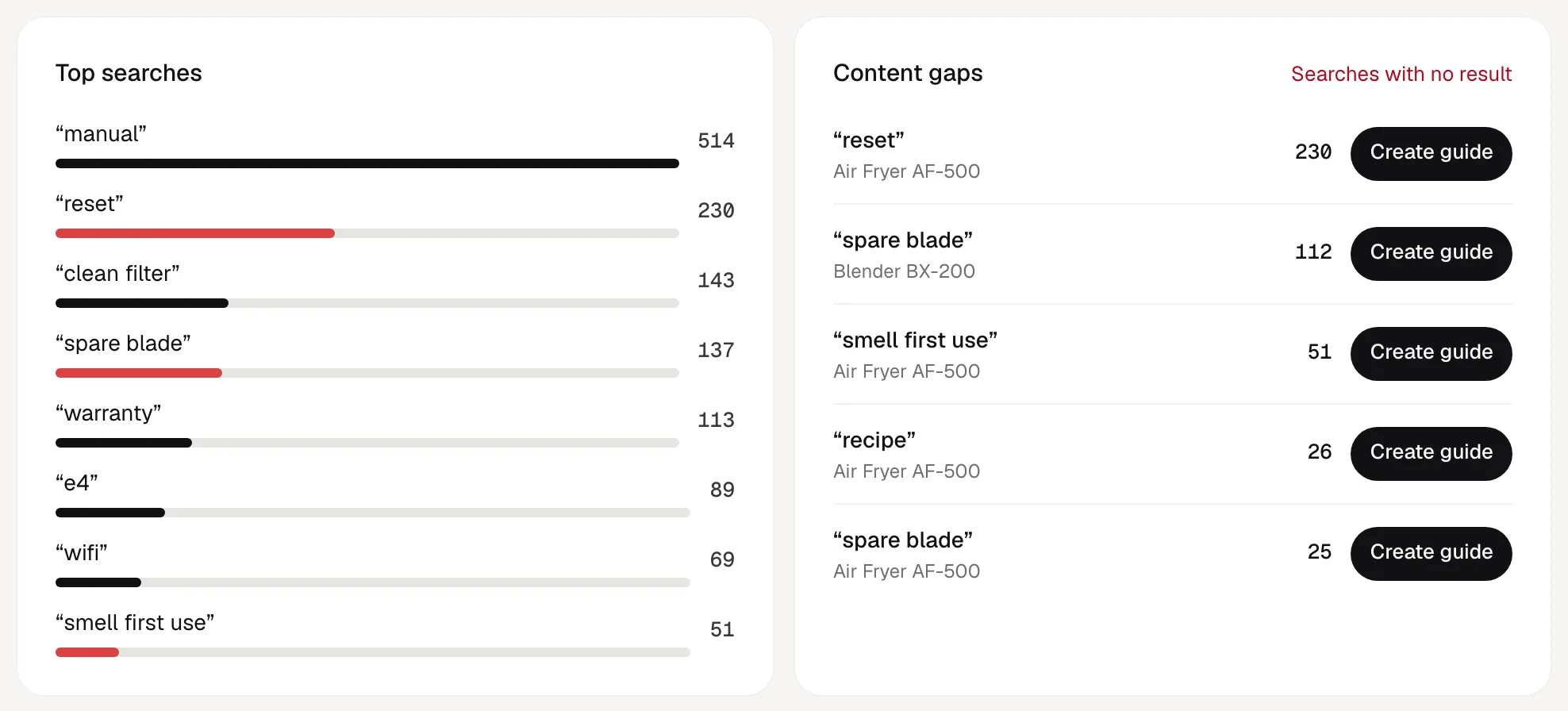
Each gap has a Create guide button. Write the guide, add the customer’s word as a keyword, and the next person who searches for it finds the answer.
How to measure the effect
ItemDocs can show what customers do on the page. Whether calls go down is something only your support data can show. Measure both:
- Take a baseline. For the products you launch first, count tickets per week by reason for the month before.
- Watch use. In ItemDocs: QR scans, page opens, searches, which guides, FAQs and troubleshooting issues are opened, how far videos are watched, and support taps. All of it exports as CSV.
- Read the gaps weekly. Unanswered searches, and products where support taps stay high, point at content that isn’t working yet.
- Compare by reason. After a month, compare tickets for the reasons you covered with those you didn’t. Look at reasons, not totals; sales volume moves totals.
Analytics on product pages are anonymous: no cookies, no accounts and no IP addresses stored, only a daily-changing hash, kept for 13 months.
The first 30 days
- Pick the one product with the most tickets, not the newest.
- Ask your support team for its top ten questions and the exact words customers use.
- Publish Start Here, the manual, troubleshooting for the top three symptoms, five FAQs and your support details.
- Print or sticker the QR code on stock and add it to the quick-start card.
- Every week, turn the top unanswered searches into guides or FAQs.
- After 30 days, compare tickets by reason with your baseline, then roll out to the next products by CSV import.
Related
- GuideQR codes for product manualsWhat to put behind the code and how to print it.
- OverviewFor manufacturersCost, support, experience and intelligence in one page.
- Use caseWarranty registrationTake warranty questions off the phone too.
- Use caseReduce manual printing costsWhat can move online, and a calculator for your own numbers.
Answer the first question before it becomes a call.
One product is free forever, with every module. No card required.
See pricing →